 Home Spacess

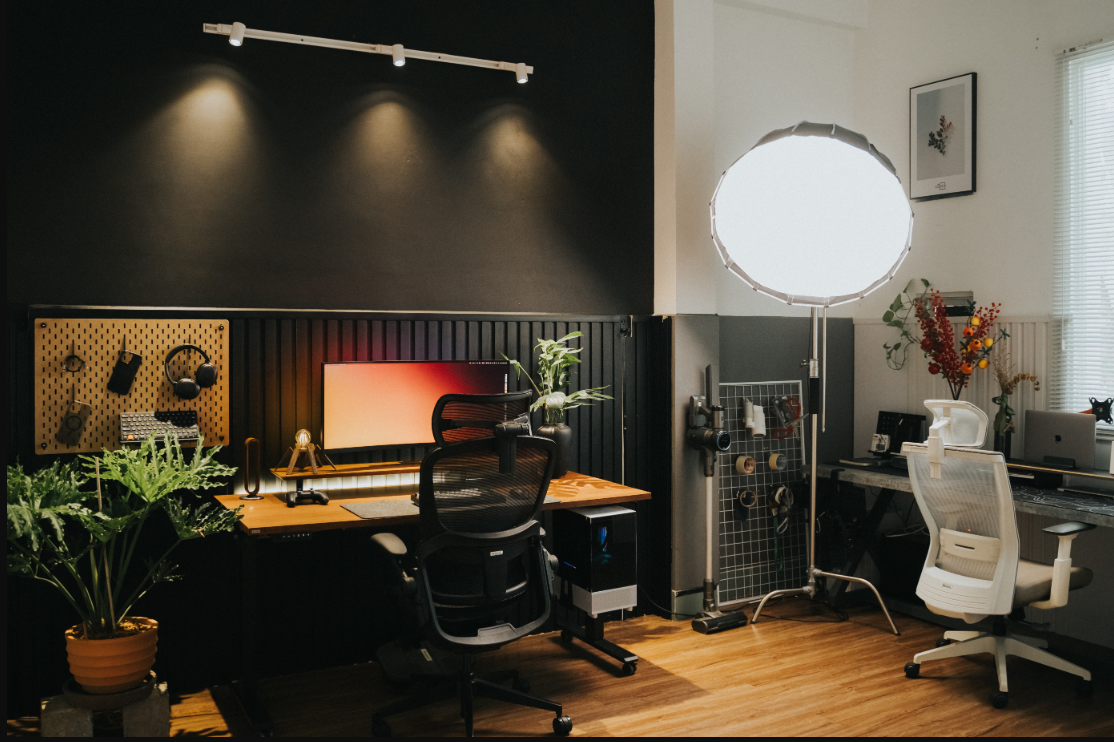
What happens when two people need to work from home, but there is only one spare bedroom to share? Fitting two workstations into a small spare bedroom can feel challenging when desks, chairs, computers, and storage compete for space. However, thoughtful planning can transform even a modest room into a comfortable, productive workspace for two.
Success comes down to using every square foot wisely. Strategic layouts, clever noise control, and vertical storage transform your underutilized spare bedroom into a seamless, highly functional shared workspace.
In this article, we’ll show you how to plan, furnish, and organize a two-workstation home office that keeps the peace and your productivity intact.
Assess the Room Layout Before Setting Up Two Workstations
Start by measuring the spare bedroom and identifying its windows, doorways, electrical outlets, and available floor space. These details will help you determine whether side-by-side desks, opposite-wall setups, or an L-shaped arrangement will work best.
With remote work remaining common, shared home offices are becoming a practical necessity for many households. The US Bureau of Labor Statistics reported that 22.6% of workers worked remotely for pay in March 2026. The rate remained between 21.5% and 23.0% over the previous year, showing that remote work is here to stay.
For households with two remote workers, planning the layout carefully can help accommodate both workstations without making the bedroom feel overcrowded. Keep walkways clear, leave enough room for chairs to move freely, and position desks to make the most of natural light while minimizing screen glare. A well-planned layout allows both people to work comfortably without compromising the room’s other functions.
Select Space-Saving Desks and Office Furniture
Choose furniture that suits the bedroom’s dimensions and both users’ needs. Compact desks provide separate workspaces, while shared surfaces maximize narrow walls. Wall-mounted desks work best in tight rooms, freeing floor space and maintaining an open, uncluttered layout.
To maintain comfortable ergonomics without cluttering the room, choose slim-profile ergonomic chairs that slide neatly under desks. Utilize adjustable monitor stands and vertical shelving to lift equipment and storage off the desktop, expanding your usable surface area.
As a business grows, however, two home workstations may eventually prove insufficient for a larger team. Moving into a commercial office can provide room for additional employees, dedicated work areas, and better workplace infrastructure.
At that stage, FourSpoke office installation services may be relevant for businesses setting up desks, workstations, and other office furniture in their new space. Having professionals handle the installation and relocation process enables business owners to focus on their core processes during the project.
Plan Lighting, Power Outlets, and Cable Management
Position desks near windows to benefit from natural daylight, then add adjustable desk lamps for focused tasks and evening work. Ensure each workstation has convenient access to power outlets for computers, monitors, chargers, and other equipment. Use cable clips, under-desk trays, and labeled ties to prevent tangled wires and keep walking paths clear.
Interior designer Sarah Sham notes in a LinkedIn post that visible wires can undermine an office’s refined appearance. She emphasizes that a clean visual field promotes mental clarity. She also recommends adding low-maintenance plants, such as snake plants or pothos. These natural elements soften tech-heavy spaces and create a calmer, more inviting workspace.
Reduce Noise and Improve Privacy in the Shared Home Office
Place desks as far apart as possible, and use bookcases, fabric room dividers, or thick curtains to absorb sound and create visual separation. Rugs and upholstered furniture can also soften noise in rooms with hard floors. Noise-canceling headphones are useful when both people attend virtual meetings or handle concentration-intensive tasks simultaneously.
Separate zones also create quieter, more focused work areas. A study published by Cambridge University Press reports that a quiet work environment minimizes distractions that contribute to stress and burnout. It thus promotes mindfulness and boosts mood.
It enhances concentration and task efficiency, reduces cognitive load, and enables mental recharge, all essential for sustaining productivity in a shared spare-bedroom office.
Establish Separate Zones for Both Workstations
A productive home office depends on more than having enough desk space. A study published on ResearchGate found that 70% of respondents strongly agreed that their home environment supported productive work. The findings also linked perceived productivity to demographic factors and home settings.
When two people share a bedroom office, creating separate work zones can help both maintain focus and work comfortably.
Place desks along opposite walls to give each person a dedicated area and keep them out of each other’s video-call backgrounds. If the room is too small for this layout, use a tall bookcase as a divider that also provides storage. These arrangements create a clearer sense of personal space without requiring a larger room.
Balance Work Needs With the Bedroom’s Other Functions
Harmonizing professional demands with the room’s remaining layout ensures your spare bedroom remains a comfortable, highly versatile space. Choose foldable desks, compact cabinets, or storage ottomans to keep office equipment organized when the room serves as a guest bedroom. Use labeled drawers and closed storage to conceal paperwork, chargers, and accessories after working hours.
Position workstations away from the bed when possible to create a clearer boundary between professional tasks and relaxation. Establish a daily routine for tidying the desks and storing equipment. These practical choices preserve the bedroom’s comfort while supporting two productive workstations.
Frequently Asked Questions
What is the ideal desk size for two people sharing a home office?
For a shared home office, each desk should ideally be at least 48 inches wide and 24 inches deep. This provides ample space for dual monitors, laptops, and paperwork. Choosing compact yet functional dimensions ensures both users remain comfortable without crowding.
Can two people share one large desk comfortably?
Yes, two people can share one large desk comfortably if it spans at least six feet in length. Ensuring individual cable management and adequate clearance for two ergonomic chairs prevents crowding. Setting clear personal boundaries helps maintain daily focus.
Should two home office workstations have separate internet connections?
Separate internet connections are usually unnecessary unless both users handle heavy data transfers simultaneously throughout the entire day. A single high-speed broadband plan easily supports dual remote work setups. However, using wired Ethernet cables prevents frustrating lag during critical video calls.
Key Metrics for Shared Home Office Setups
| Metric | Value |
|---|---|
| Workers who teleworked or worked from home for pay in March 2026 | 22.6% |
| Telework rate range over the previous year | 21.5%–23.0% |
| Work-from-home respondents who agreed their home environment enabled productive work | 70% |
| Recommended desk width for each person | 48 inches |
| Recommended length of a shared desk for two people | At least 6 feet |
Creating a home office with two workstations in your spare bedroom does not require a large budget or extensive renovations. A thoughtful layout, compact furniture, separate zones, good lighting, and organized storage balance productivity, privacy, and comfort. Consider each person’s work habits, equipment, and comfort when making design decisions.
Most importantly, maintain clear boundaries between work and personal time to prevent the shared space from feeling overcrowded. A few thoughtful adjustments can transform an underused bedroom into a practical, inviting workspace that meets both your needs.

Team Home Spacess shares simple, practical design ideas that work for real families. The team focuses on cozy décor, soft colors, and natural textures that make a space feel truly lived-in. From everyday decorating tips to creative home projects, Team Home Spacess is dedicated to helping readers create warm, comfortable, and inviting spaces with a fresh and personal touch.